

I usually judge a calculator by what happens after the first few study sessions. A new tool can feel impressive when I am testing buttons and exploring menus, but the real question is whether I still reach for it weeks later when homework is due, a graph needs checking, or a symbolic expression refuses to behave. Graphing calculator plus 84 83 has made a convincing case as a practical mathematics companion, especially for students who want more than a basic phone calculator without paying an upfront price.
This is an Android education app from lethinhien, presented as a graphing calculator with support for algebra, equations, fractions, and the familiar 84/83 calculator style. It is free to install, suitable for Everyone, and its strong reception is reflected in a 4.6 average from around fourteen thousand ratings, alongside more than a million installs. That does not automatically make it right for every learner, but it does suggest that the app solves a common problem: carrying a useful mathematical workspace on a device most people already have.
What stays useful after the first week
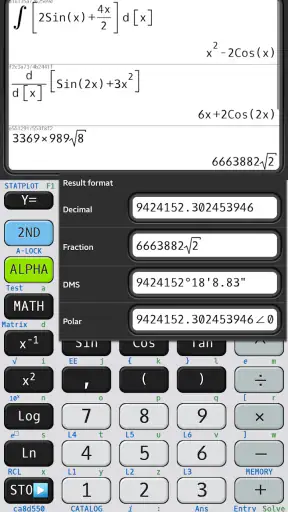
My first impression was shaped less by novelty than by convenience. A phone calculator is always nearby, yet the standard calculator app is often too limited for school mathematics. Switching between a simple arithmetic screen and a graphing tool can interrupt the way I think. Here, the purpose is clearer: I can enter an expression, inspect a graph, work with fractions, and move toward an equation-solving task without immediately needing another app.
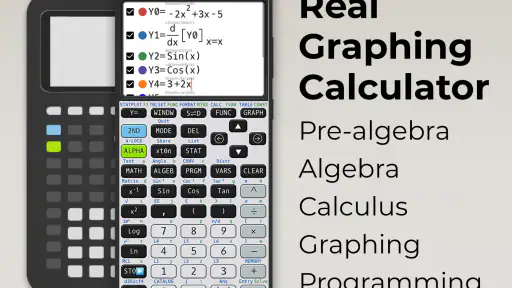
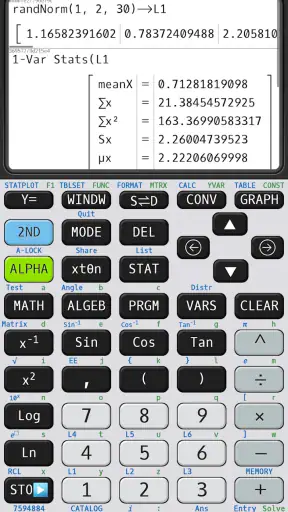
The 84 and 83 reference is important because it gives the app a recognizable direction. Anyone accustomed to that family of calculators will understand the general idea of a dedicated mathematics interface more quickly than they would with a completely unfamiliar design. It is not merely a large keypad for addition and subtraction. The attraction is having a more capable environment for checking relationships between formulas and their visual results.
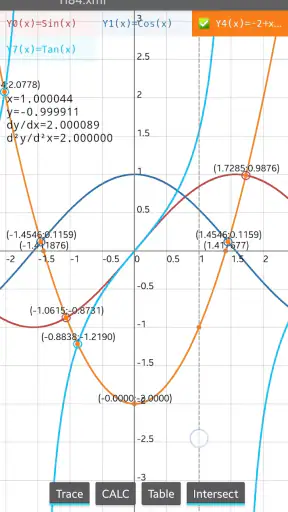
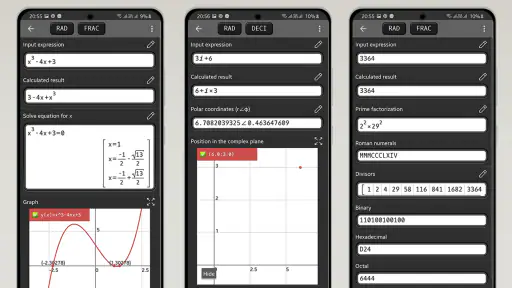
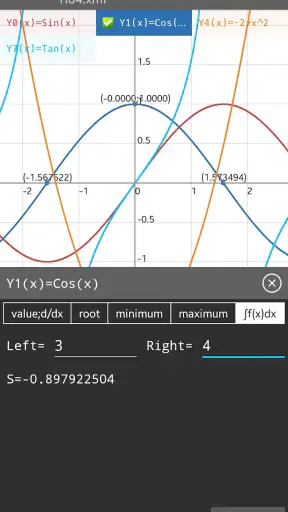
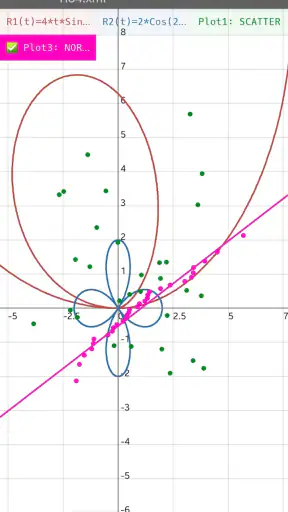
During a first week of use, the most valuable habit is to stop treating the app as an answer box. I get more from entering a formula, looking at its graph, changing a value, and then asking whether the result makes mathematical sense. That small loop is useful for algebra and introductory functions because it connects the symbolic expression with its shape. A result that looks plausible on a keypad can become obviously wrong when the graph behaves in an unexpected way.
Fractions are another reason this feels more appropriate for study than a conventional calculator. Decimal answers are convenient, but they can hide the structure of a calculation. When I am checking an exercise, keeping the fractional form visible helps me compare my work with the expected method instead of only comparing final rounded values. This is especially helpful when a mistake comes from simplifying too early or entering a denominator incorrectly.
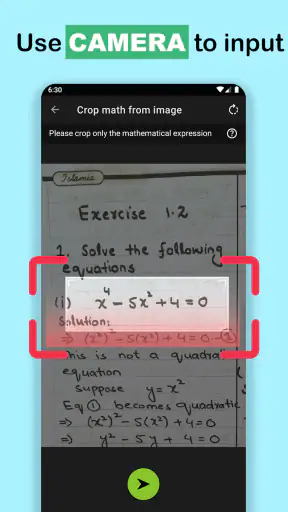
The app also fits short, realistic moments. Imagine working through a worksheet at a kitchen table and reaching a quadratic expression that you have solved by hand. I can enter the equation, check the solutions, and then graph the related function to see where it crosses the axis. If the algebra and the visual result disagree, I know to revisit the input rather than blindly trusting either one. That is a better workflow than copying a number from a basic calculator and moving on.
Still, the first-week appeal has limits. A phone screen cannot recreate the physical confidence of a dedicated calculator with tactile keys. If I am entering many expressions quickly, I may need to look down more often and correct a mistyped symbol. The app is also less comfortable when my phone is being used for a lesson video, a digital textbook, or a messaging conversation at the same time. Its convenience depends on the phone remaining available and distraction-free.
Useful workflows for actual study
One workflow I recommend is to use the graph as a verification layer, not as a replacement for working. First solve or simplify the problem on paper. Then enter the original expression and the result separately. Comparing their graphs or values at selected inputs can expose a sign error that a single final calculation would miss. This approach turns the app into a checking partner rather than a shortcut that weakens understanding.
A second useful approach is to test boundary values. When working with a formula, I can try a simple input such as zero, a negative value, or a fraction and observe whether the output follows the behavior I expect. This is particularly valuable when learning domains, intercepts, and transformations. It also teaches me to notice when a graphing window makes a function look misleading simply because the chosen scale is poor.
For fractions, I find it helpful to enter both the unsimplified expression and the simplified version. If they do not agree, the issue is usually an input error or an algebra mistake. This two-stage check is more informative than pressing an equals key repeatedly because it shows exactly where the calculation stopped matching.
These habits are not flashy features that sell an app in a short description, but they are the reason I could imagine keeping this one installed. The strongest value comes from combining symbolic work, numerical checking, and visual inspection. Students who only want instant answers may not notice that advantage, while students who are trying to understand why an answer is correct can benefit from it every week.
Month-to-month value, friction, and staying power
After the initial exploration, the app becomes less about discovering controls and more about reducing small interruptions. I can use it for a quick algebra check one day, a graphing exercise another day, and fraction work later without maintaining several separate tools. That breadth gives it recurring value, particularly during a course where the required calculator changes from chapter to chapter.
The free price makes experimentation easy. I do not have to decide in advance whether graphing or equation work will become part of my routine. I can install it, try it with real exercises, and keep it only if it earns that space. There are in-app purchases ranging from $0.99 to $3.99 per item, so I would pay attention to any optional purchase screen before confirming a transaction. The important point for a student is that the basic decision starts with no purchase commitment.
Its compatibility is also reasonably approachable for older devices because it supports Android 7.0 and later. That matters in families or schools where not everyone has a recent phone. On the other hand, an older operating system does not guarantee an identical experience across every device. Screen size, keyboard behavior, and performance can affect how comfortable a graphing interface feels, so I would test the app on the actual phone I plan to use rather than judging it only from screenshots.
The current version is 7.5.1.483, which makes maintenance part of the long-term conversation. I like seeing an app with an identifiable current release rather than something that feels abandoned, but updates can also change layouts or interaction patterns. For a calculator, stability matters more to me than constant visual novelty. If I have built a study habit around a particular location for a graphing control, even a small redesign can create unnecessary friction during exam preparation.
Maintenance is otherwise light in the everyday sense. I do not need to organize a library of lessons, create a profile, or feed the app a continuing stream of content to keep it useful. That is a quiet advantage over educational platforms that demand regular downloads, accounts, or course management. The trade-off is that the app does not replace teaching material. It can help me calculate and inspect, but it cannot explain a concept with the depth of a teacher, textbook, or structured course.
This distinction answers an important question about who should use it. I would recommend it to a student who already knows the basics of entering expressions and wants a portable graphing and algebra tool. I would also suggest it to a parent helping with homework, because checking a graph or fraction can be faster than searching for a separate calculator. It is less suitable as a first and only mathematics resource for someone who needs step-by-step instruction or detailed explanations of every transformation.
Teachers and advanced students may also want to consider classroom rules. A phone-based calculator can be useful for practice at home, but some tests require an approved physical calculator or prohibit phones entirely. I would not assume that installing this app gives me permission to use it in an assessment. Its best role is preparation, checking, and everyday revision unless the relevant teacher or institution explicitly allows it.
Where fatigue begins
The main source of fatigue is input. Graphing calculators are powerful because they expose more controls, but that also means more chances to mistype a variable, sign, exponent, or parenthesis. On a touchscreen, the lack of physical feedback makes repeated entry tiring. I can reduce that problem by slowing down, checking the expression before evaluating it, and using a consistent notation habit, but the burden does not disappear.
Another issue is the temptation to accept a graph too quickly. A graph is only as trustworthy as the expression and viewing window behind it. If the window is too narrow, too wide, or poorly centered, an important feature may be hidden. I treat the first graph as a hypothesis and adjust the view or test selected values before drawing a conclusion. That extra step is essential for anyone using the app to learn rather than merely decorate an answer.
The 84/83-inspired approach may feel familiar to some people and dated to others. If I have spent years using a different calculator layout, I may need time to build muscle memory. A modern symbolic mathematics app may feel smoother for complicated notation, while a dedicated physical graphing calculator may remain faster for long sessions. This app sits between those options: more capable than a basic calculator and more convenient than carrying another device, but not automatically the best interface for every workflow.
There is also a concentration trade-off. Because the calculator lives on a phone, notifications and other apps are always close by. During a focused study block, I would use a distraction-free setting or place the phone where I am less likely to switch tasks. That is not a mathematical limitation, but it directly affects whether the app supports a lasting habit. A tool that is technically convenient can still be counterproductive if opening it leads to ten minutes of unrelated scrolling.
For experienced users, the question is not whether this app can perform useful calculations; it is whether its balance of portability and interface suits the work. If I need heavy symbolic manipulation, formal proof support, or a full computer algebra environment, I would choose a more specialized alternative. If I only need quick arithmetic, the built-in calculator is simpler. Graphing calculator plus 84 83 earns its place in the middle, where graphing, equations, algebra, and fractions all matter but carrying a dedicated calculator is inconvenient.
A practical routine that keeps it useful
My preferred routine is simple. I use paper or a notebook for the reasoning, enter the original problem carefully, check a few values, and then inspect the graph when the problem involves a function. I save the result mentally or in my notes rather than assuming the app will teach me what to do next. This prevents the calculator from becoming a crutch and makes each session reinforce the underlying skill.
I also avoid using it for every tiny calculation. If I need to add two ordinary numbers, the fastest option is still the basic calculator. I open this app when its extra capabilities justify the additional controls. That selective use reduces screen fatigue and keeps the more advanced functions meaningful instead of turning every homework step into a slow touchscreen exercise.
The app’s long-term value therefore depends on the kind of learner using it. Someone studying algebra, functions, or graph interpretation can return to it repeatedly because the same core tasks appear in many different exercises. Someone looking for lessons, worked explanations, or a polished all-in-one study platform will probably outgrow it quickly or feel that it leaves too much of the learning work to them.
My lasting verdict is positive, with a clear condition: I would keep Graphing calculator plus 84 83 installed if I regularly need a portable graphing and algebra calculator, not simply because it was interesting during the first few minutes. Its free entry point, broad mathematical purpose, and familiar 84/83 direction make it easy to adopt. The 4.6 average and million-plus install level also show that it has found a substantial audience, while the Everyone rating makes it approachable for general educational use.
The app earns lasting space when I use it to verify thinking, not replace thinking. That is where its recurring value becomes clear. It can connect an equation to a graph, preserve useful fraction work, and provide a convenient second opinion during homework. Its weaknesses—touchscreen entry, phone distractions, and the absence of full teaching guidance—are real, but manageable for the right user.
I would recommend it to students who want one flexible mathematics tool for regular practice and to anyone who values checking an answer from more than one angle. I would skip it in favor of a basic calculator for simple arithmetic, a structured learning app for guided instruction, or a physical graphing calculator for high-volume exam-style entry. For everyone in between, this is a sensible free starting point that can remain useful long after the novelty of drawing the first graph has faded.


